How it works
Every piece, explained without jargon.
The homepage showed you the problem AIBOS solves. This page walks through how it actually works — thread by thread, rule by rule — in words that don't assume you're a developer.
Trellis — the thread system
Every piece of work becomes a thread that follows you.
Think of your email inbox: every reply folds into the thread it belongs to, so a conversation never scatters into fifty separate messages. Trellis brings that same idea to how your AI agents work.
A bug fix, a decision about pricing, a half-finished idea — each one gets its own thread, and that thread follows the work across sessions and across agents — all within your sphere (the one folder that holds your whole AI operation). Come back three weeks later, open the same thread, and every past step is still there, in order.
Everything written to a thread goes into a diary that can only be added to, never edited — so the history is always true. (Technically: one file per sphere that only ever appends —core/registry/trellis-events.jsonl— and every other view of a thread, like the list you actually browse, gets rebuilt from that one file, so it can never quietly drift from what really happened.)
Whichever agent is doing the work makes this call itself, in the moment, using judgment. The same four questions guide it, every time:
Has this been touched before? No — start a brand-new thread for it.
Does it relate to something already going? Extends existing work → connect it to that thread. A fresh angle on something already mature → open a side-thread. Two threads turn out to be the same thing → merge them.
Has the idea matured into something real? Yes → it graduates. Same thread, same history — it just starts carrying the status of a real project from here on.
Whatever happens Always leave a note about what the next step is, and keep anything the work produced right where the thread lives.
The tool refuses to save work that hasn't declared where it belongs. Every time, no exceptions.
“The agent who's in the room when the work happens is a better judge of where it belongs than a model trying to reconstruct that afterward, from text alone.” That's a deliberate choice — no similarity scores, no matching algorithm guessing on your behalf. Just judgment, made in the moment.
Open that bird's-eye view and it sorts by what needs you: anything blocked, or anything waiting specifically on you, always floats to the top. A list sorted by whatever you touched last is a fridge you have to keep opening just to check on it. This one is a radiator.
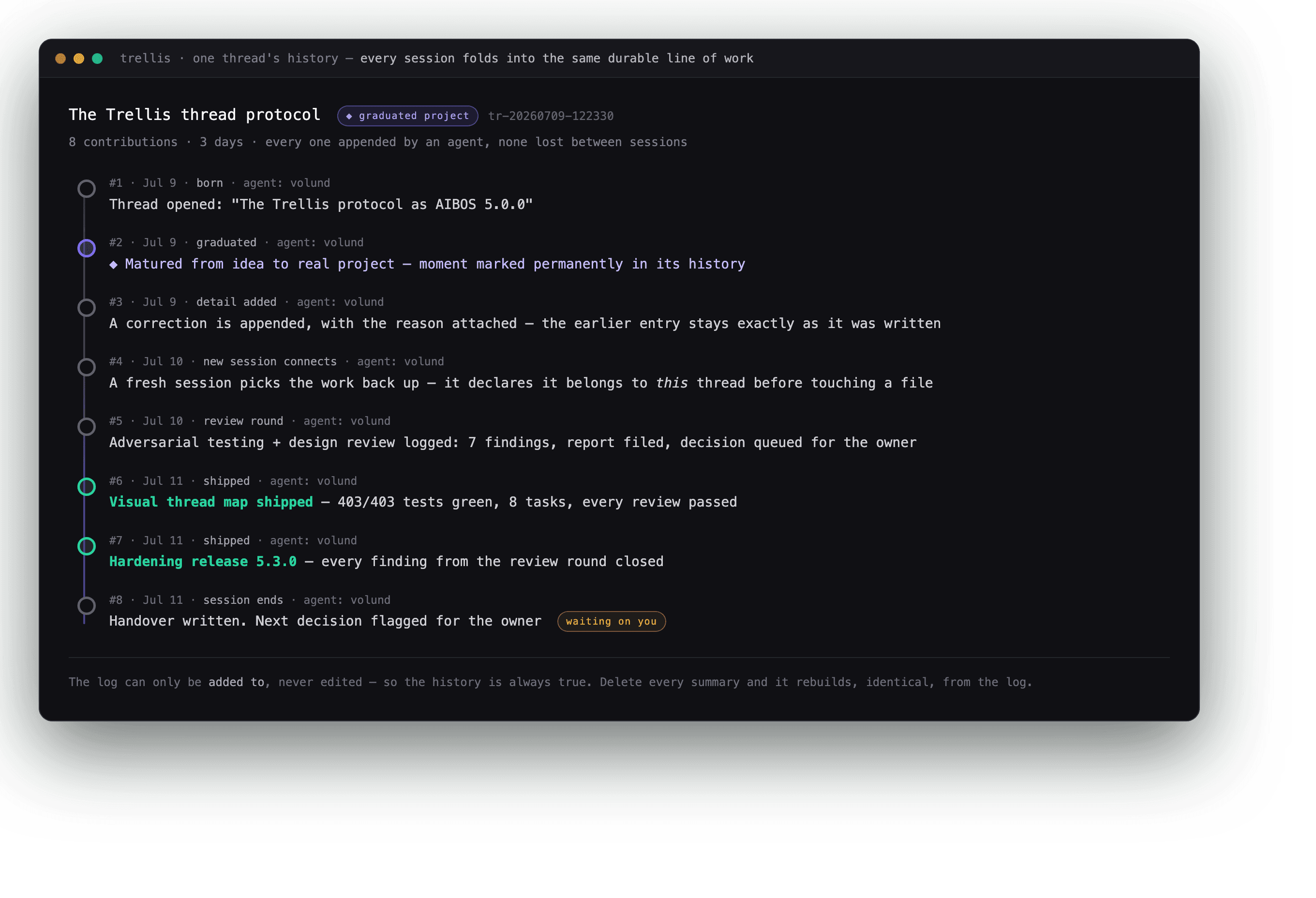
One thread's real history from a live sphere: three days, eight contributions, nothing lost between sessions.
The view above is shown translated — the standard's own vocabulary is Norwegian today, with a full English translation on the roadmap.
Won't save without an address
If a piece of work doesn't say which thread it belongs to, AIBOS refuses to save it — every time, no exceptions. There's no quiet fallback folder for things nobody bothered to file.
No tangled family trees
Before anything gets linked as a parent of anything else, a quick check makes sure the chain of connections stays a straight line — so a thread can never end up as its own ancestor.
Unsure? It says so, out loud
If the agent isn't confident where something belongs, it doesn't guess quietly. It flags the thread as blocked or starts a conversation with you — an uncertain thread can never slip through disguised as “ready to build.”
Graduation is permanent
When an idea matures into a real project, that moment gets marked permanently in its history. Nothing about the earlier work changes — the thread just carries a new status from here on, and every step that led there stays exactly as it was.
Memory
Six kinds of memory, and one honest gap.
Plain text files you can open and read yourself — no special database, nothing hidden behind an interface only the agent can see.
What exists, and where — a map of every file and folder, so nobody has to ask “where did we put that?”
Why we decided things — every real decision gets logged the moment it's made, with the reasoning behind it.
What past sessions did — searchable, so every new session can catch up on its own and you skip the re-explaining.
Reusable how-tos — coming soon. Not built yet, and we'd rather say that than pretend it's there.
What the agent has learned here — the quirks specific to your setup: what broke last time, what actually worked.
Who you are and how you like to work — written by you, for you. No automated process ever touches this one.
Only the size limit is a hard technical wall. The other three are working agreements, and the nightly check verifies every one of them — that distinction matters, so we tell you plainly.
There's a hard cap on how much can be written before AIBOS forces a cleanup. It's the only rule on this list the code actually enforces — hit the cap and the write is rejected outright, so the file has to be tidied before anything new fits.
The most load-bearing rule in the whole system. Get this backwards, and the agent learns from — and repeats — the wrong lessons it wrote about itself.
Anything you typed by hand is protected from cleanup. A background job can add notes; it can never quietly rewrite yours.
If the memory system has a bad day, AIBOS keeps going anyway — it's all plain text files, always available locally, so an outage never stops you from working.
After a piece of work is delivered — and only then — a background check asks one question: did I learn anything worth keeping? What survives gets filed into the right kind of memory above, one write at a time, and becomes part of the thread it came from.
Memory is read once when a session starts and held steady from there — which keeps sessions fast and roughly 90% cheaper to run.
A search across everything past sessions did. Every result is marked “reference only” and anything sensitive gets stripped out before it's shown — and if the search itself is unavailable, work simply continues without it.
5 parallel sessions. Zero corruption.
Five AI sessions wrote to the same memory file at the same moment. With the one-writer rule and the size cap in place: 75 writes accepted, 125 turned away, zero corruption. Turn those two rules off, and that same file balloons to 1.2 million characters of garbage — half-written sentences from different sessions tangled together.
“The limit that annoys you is the limit that forces consolidation.”
Agents
Every agent is born knowing its job.
Nobody has to guess what an agent is allowed to do. Its job is decided the moment it's created, and it stays on record for anyone — human or agent — to check.
The one you talk to
A thinking partner inside a chat, like ChatGPT or Claude. You see its reasoning as it happens. It only runs when you're there — no background surprises.
The one that works around the clock
Runs a specific job day and night without you watching it. It reports back with what it finished — and it has a budget and a mandate, so it can't just do whatever it wants.
The one that handles email and calendar
Always on, and it represents you to other people. Anything that actually needs a human gets handed back to you. Honest note: this is the newest of the three, and the hardest to get right — the safety rules for it ship before the agent does.
The caretaker
Every night, without anyone asking, the caretaker does three things in order. It tidies the workspace first, fixing what it can safely fix on its own and reporting — never guessing — what it can't. It checks how far your sphere has drifted from the current standard and works out the upgrade path, but never takes it without your explicit yes; say yes, and it moves one version at a time, with a health check after each step, and a precise rollback if anything goes red. And it commits that night's log to your own repository, so the record is always there.
Exactly one per sphere, set up automatically the moment the sphere is created. It never holds a conversation and never makes a decision on its own — and it never commits into the standard itself, only into your copy.
Your lead agent (HeadOfSphere)
Every sphere starts with one agent already there, waiting — in the standard's own words, “your co-creator and thinking partner — the first, and for as long as you want, the only agent you need.” Most people are new to directing AI. Its whole job is to help you do the parts you don't know how to do yet.
Small things, it just does. Bigger things, it asks first — every time, without exception.
One rights model. People and agents follow the same permission rules — the difference between what a human can do and what an agent can do is in degree, not in kind.
Commands
Ten commands you might actually type.
The commands are Norwegian today — the people who wrote this standard write in Norwegian, and an English version of the whole standard is on the roadmap. Here's what each one means, and what it actually does.
Creates a new folder the governed way. Blocks duplicates automatically, and writes a short description plus a registry entry in the same action.
Runs a piece of work through its whole life: explore → define → build → awaiting the go-ahead → running → archived.
Sorts incoming material — an idea, a file, a request — into one of four types, and saves a permanent record before the source is ever moved or touched.
Reviews what just happened and decides what's worth remembering. Never defaults to “nothing to save,” and treats frustration as a signal worth capturing.
Runs a reversible experiment, clearly marked EXPERIMENTAL until it proves out and earns a real place.
Runs the built-in health check: everything's fine, or it tells you exactly what's wrong.
Installs, checks, or removes an add-on — scanning every line of its code first for anything dangerous before it's allowed to run.
The full change-and-release workflow for the standard itself, walked through in ten defined phases.
The Trellis command line: list your threads, open one, log an update, and more.
Brings an existing company's files into the standard gradually, file by file, with two checkpoints where a human signs off. The command works and is carrying real migrations today; its packaging as an installable add-on is still being finished.
Health check
Start small, grow into stricter checking.
AIBOS ships with a built-in health check — the standard calls it the conformance audit. Every night, it looks at your workspace and tells you the truth about how it's doing.
“This is the master standard you've chosen to follow. You pick the version. Once you opt in, it holds you to it.”
You choose when to upgrade — updates are announced, never forced on you. Move version by version, and roll back if a new one doesn't work for you. Nothing updates itself overnight without your say-so.
Just the essentials: files are named and filed consistently, decisions get logged, nothing goes missing.
Day-to-day discipline: every piece of work has to declare where it belongs, duplicates get blocked, incoming material gets sorted before anyone touches it, and memory follows its own rules.
For when your company outgrows one workspace: kicks in automatically the moment a second one exists.
- Every night, while nobody's watching, a check walks the whole workspace — roughly 1,075 lines of checks across 32 areas — and flags anything wrong as a Blocker, a Warning, or just a Note.
- The standard checks itself the same way, so its own rules can't quietly go stale without anyone noticing.
- Versions are numbered, and the master copy always stays in working order. Every new version ships a script that does the upgrade for you, start to finish.
- Only the standard's own maintainers can edit the master copy directly. Your workspace catches up to it — it never commits into it.
- What it can send is a proposal: patterns your caretaker keeps seeing become drift reports and hypotheses to the standard itself, so every sphere running it makes the standard better for everyone. A concrete change is drafted locally and held until you release it — nothing leaves your sphere without you pressing the button. This upstream feedback is on by default at install, shown plainly, and you can turn it off.
“How compliant you are is measured, nightly and honestly — you always know exactly where you stand.”
This loop has actually closed in real use: feedback from a live workspace became a patch, the patch shipped as a release, and two separate workspaces pulled it in — the same day.
Add-ons
The catalog offers. Your workspace decides.
An add-on is a self-contained, optional package you choose to install — or don't. Nothing installs itself, and nothing arrives without saying what it is first.
Safety-scanned before it can install
Every line of code in an add-on gets checked before it can run. Dangerous patterns — commands that could wipe your files, for example — are blocked automatically.
Every add-on declares itself
Each one comes with a plain declaration of what it is, who made it, and which version of AIBOS it works with. Nothing installs silently, and nothing pretends to be something it isn't.
Uninstall leaves a marker behind
Remove an add-on and AIBOS archives it, with a note showing where it went. Nothing is ever silently deleted.
Stateful learning, already installed the day your sphere is born.
Search past sessions and find what actually happened, word for word.
"vask" = clean — a self-cleaning check that runs before things get messy.
"foster" = bring up — births a new agent or person sphere.
Nightly maintenance, scheduled automatically on your machine.
Catches it when your documentation and your actual files fall out of sync.
"product governance" — a rulebook for product decisions.
"external comms" — guardrails for the email/calendar agent, built on one rule: everything arriving from outside is treated purely as information to read. Commands only ever come from you.
"storage" — keeps large files out of your version history, so it stays fast and small.
"map engine" — draws a visual map of how your company's pieces connect.
"business building" — a structured framework for building out a company, piece by piece.
"go-to-market management" — plans how you'll actually reach customers, stage by stage.
Brings an existing company's files into the standard gradually. The command already runs real migrations; the installable add-on packaging is the part still being finished.
On the roadmap: turning add-ons on or off per workspace without reinstalling them, add-ons that automatically bring along whatever they depend on, and add-ons that live in their own separate projects, locked to an exact version.
Request access, and raise your first sphere.
We'll invite you in — then it's two commands, self-hosted, no account required to run it.