The agentic AI OS that organizes and improves itself.
Become an AI master from the start. You don't have to figure out folders, memory or structure on your own first — you download a standard that already knows how this is done, and start working inside it.
private beta · invite-only · early access
What you'll do once you're in
Download the AIBOS standard.
One command clones it; one command raises your workspace.
Open Claude Code or Codex, already set up right.
You start from a pre-configured best-practice setup: the memory system, the thread system, the rules and the commands are all in place from your very first session. Nothing to wire together yourself.
Build and explore, freely.
Structure and control, with no ceiling: the system keeps order around you while you work, and never limits what you can build. 100% freedom, no limits.
“We've never done this before — so we'll surely figure it out.”The spirit every AIBOS sphere is born with.
The problem
It works — until the project grows.
A Claude Code or ChatGPT session feels great on a small project. Then it grows — you want to turn the experiment into real work — and you become the one holding it together: folders, files, storage, memory, all of it on you. Install skills, install memory plugins, and the agents still make a mess. An agent writes a new file instead of finding the old one and continuing it. It doesn't pick up the thread from this session, or the one before. To keep the context under control, you end up starting fresh sessions and saving everything by hand. That's what AIBOS replaces.
Every session starts over.
- The agent writes notes-v2.md instead of opening notes.md.
- Skills and memory plugins help — until the project grows, and the mess comes back.
- To keep the context under control, you start a new session and save everything by hand — again.
Order that survives the project growing.
- Before it saves anything, the agent asks: does this belong to something we already started?
- Worked on before, it finds that thread and continues it — like a reply landing in the right email thread.
- The next session already knows what happened. You don't start over, and you don't save by hand.
Trellis — the thread system
Work arrives as threads, not chaos.
Think about an email inbox: every reply folds into the thread it belongs to, so nothing gets scattered across fifty separate messages. Trellis is that same idea for your AI agents' work — a bug fix, a design decision, a half-finished experiment. Each one lives on a durable thread that follows the work across sessions and across agents — all of it inside your sphere (AIBOS's word for the one folder that holds your whole AI operation).
Before anything gets saved, the system asks itself one question: does this belong to something we already worked on, or is it new? Answer yes, and it finds that thread and keeps writing on it — instead of starting a new file that nobody will find next time.
Touched before? No — open a new root thread.
Extends existing work? Yes — connect it to the thread.
New angle on mature work? Yes — open a side-thread.
Binds two threads together? Yes — merge them.
The tool refuses to save work that hasn't declared where it belongs. Every time, no exceptions.
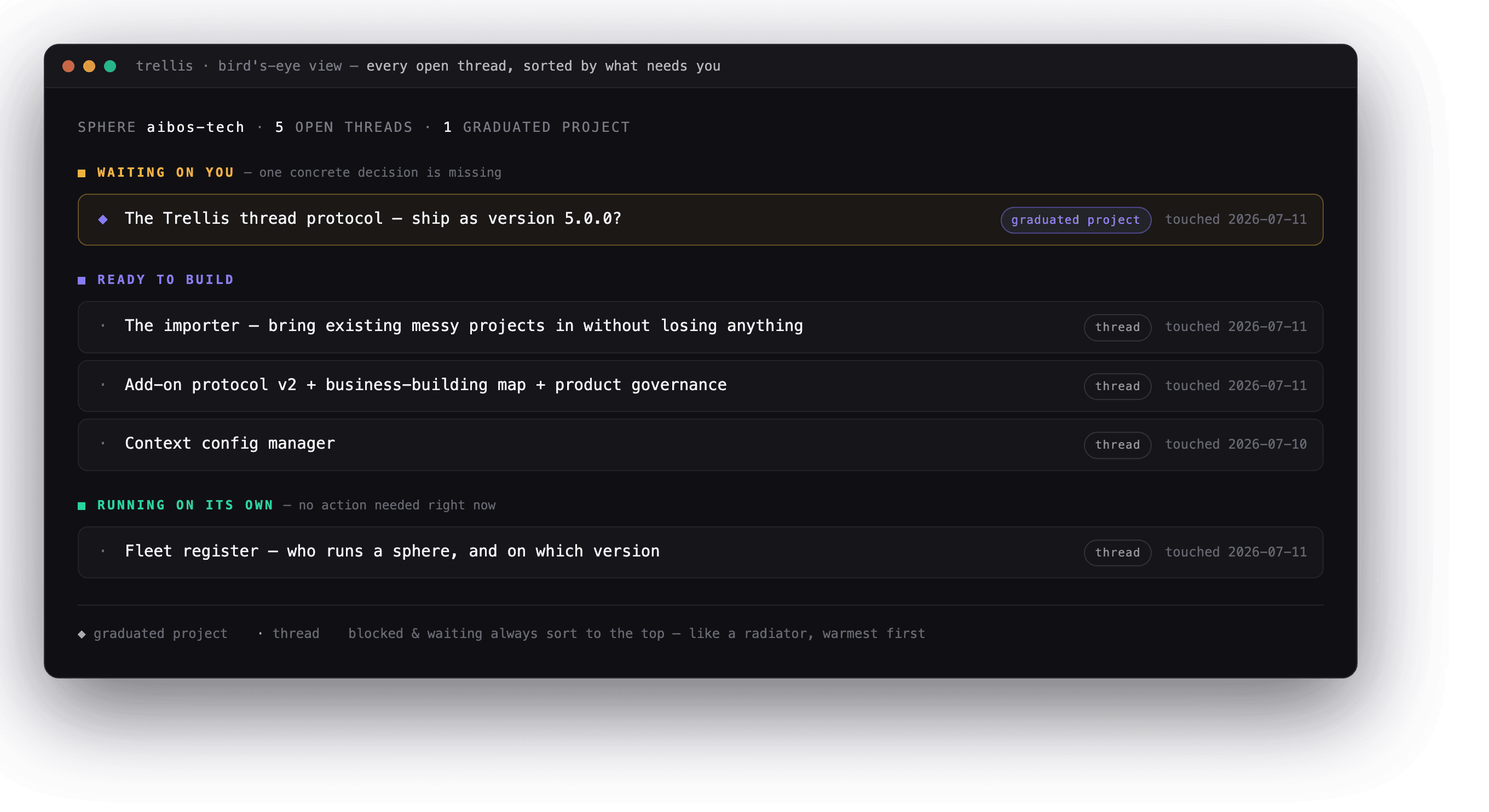
The bird's-eye view: every open thread, sorted by what needs you first — from a live sphere. “A list sorted by last-touched is a fridge you have to open. This one is a radiator.”
The view above is shown translated — the standard's own vocabulary is Norwegian today, with a full English translation on the roadmap.
Memory
Six kinds of memory, and a limit that forces discipline.
Plain text files you can open and read yourself. No special database required.
What exists, and where — a map of every file and folder.
Why we decided things — every real decision, logged as it happens.
What past sessions did — searchable, so you never have to ask twice.
Reusable how-tos — coming soon, not built yet.
What the agent has learned here — the quirks specific to your setup.
Who you are and how you like to work — written by you, never touched by an automated process.
5 parallel sessions. Zero corruption.
We ran five AI sessions, all writing to the same memory file at the same moment. AIBOS enforces two simple rules: only one writer at a time, and a hard limit on how much can be written before it forces a cleanup. Result: 75 writes accepted, 125 turned away, zero corruption. Turn those rules off, and that same file explodes to 1.2 million characters of garbage — half-finished sentences from different sessions tangled together.
“The limit that annoys you is the limit that forces consolidation.”
Agents
Three kinds of agent, plus a cleaner that works while you sleep.
Every agent AIBOS creates gets a defined job from the start, so you always know what it's allowed to do without having to ask.
The one you talk to
A thinking partner inside a chat, like ChatGPT or Claude. You see its reasoning as it happens. It only runs when you're there — no background surprises.
The one that works around the clock
Runs a specific job day and night without you watching it. It reports what it finished, not its whole thought process — and it has a budget and a mandate, so it can't just do whatever it wants.
The one that handles email and calendar
Always on, and it represents you to other people. Anything that actually needs a human gets handed back to you. Honest note: this is the newest of the three, and the hardest to get right — the safety rules for it ship before the agent does.
The caretaker
Every night, without anyone asking, the caretaker tidies the workspace first — and that's only where it starts. Exactly one per sphere, set up automatically when the sphere is created. It never holds a conversation and never makes a decision on its own.
Your lead agent (HeadOfSphere)
Every sphere starts with one agent already there, waiting — in the standard's own words, “your co-creator and thinking partner — the first, and for as long as you want, the only agent you need.” Most people are new to directing AI. Its whole job is to help you do the parts you don't know how to do yet.
Every night, while you sleep
It doesn't just tidy. It makes the whole system smarter.
The caretaker is a job that runs on a schedule and reports what it found. Nobody talks to it.
Tidies first, inspects after
It runs the cleanup before anything else, fixing what it can safely fix on its own. What it can't fix, it reports — it never guesses.
Finds the upgrade path — never takes it without you
It checks how far your sphere has drifted from the current standard and works out the path to catch up. It never upgrades without your explicit yes. Say yes, and it moves one version at a time, with a health check after each step — trouble means a precise rollback, not a guess.
Commits the night's log to your own repo
Everything it did and found gets committed and pushed to your own repository, so the record is always there — yours, not anyone else's.
Patterns it keeps seeing in your sphere become drift reports and hypotheses — proposals sent to the standard itself, so every active sphere makes the standard better for everyone. A concrete change goes further: drafted locally, then held until you release it. Nothing leaves your sphere without you pressing the button, and the caretaker never commits into the standard directly.
This upstream feedback is on by default when you install — clearly and visibly, not buried in a setting — and you can turn it off any time.
Once you're in
One command. Nothing improvised.
install.sh builds your first sphere — the one folder that holds everything — and checks its own work before handing you the keys. This is what happens the moment your access is approved.
- Your lead agent, named and ready to think with you
- The nightly caretaker, scheduled for its first cleanup
- Your own personal folder — memory that only you and your agent write to
- A learn/ folder with the /teach command already installed
- An automatic nightly check-up, already scheduled on your machine
- Version history for every file, like Google Docs' edit history, started with its first save
- A built-in health check that has to pass — if anything's wrong, the install stops and tells you
Add-ons
The catalog offers. Your workspace decides.
Nothing installs itself. Every add-on is a self-contained, optional package — you choose to add it, or you don't.
Safety-scanned before it can install
Every line of code in an add-on gets checked before it can run. Dangerous patterns — commands that could wipe your files, for example — are blocked automatically.
Every add-on declares itself
Each one comes with a plain declaration of what it is, who made it, and which version of AIBOS it works with. Nothing installs silently.
Removing one never erases its history
Remove an add-on and AIBOS archives it instead of deleting it, with a note showing where it went. Nothing just disappears.
Open source, honestly
Open source is the plan. Today it's private beta.
AIBOS is opening up in stages, and self-hosting stays free forever — that's the plan. Right now access is invite-only while we work through the early rough edges with real people. Today, we make money from Cloud Admin and Team subscriptions. Paid add-ons through the marketplace are next. That's the whole business model, no hidden catch.
Request access, and raise your first sphere.
We'll invite you in — then it's two commands, self-hosted, to a working sphere.